I am a homelabber. I run a whole slew of software (some of which, I’ll admit, is rarely used), mostly for my own usage. Much of it is actually publicly accessible. Let’s go through what I’ve got set up.
Hardware
My homelab consists of three Lenovo ThinkCentre M900 Tiny desktops and one Raspberry Pi 3. One of the ThinkCentres, tiny1, runs TrueNAS Core, a FreeBSD-based operating system intended to make setting up networked, shared storage simpler and easier. This primarily acts as the main storage device for the next two devices via NFS.
The two others ThinkCentres, tiny2 and tiny3, run Proxmox Virtual Environment, a virtual machine and Linux container (LXC) hypervisor based on Ubuntu Linux. They are in a simple, two-node cluster, providing high availability operation and automatic failover. These power the vast majority of the services I have chosen to run.
The final device is the Raspberry Pi 3B. It a network-wide ad blocker and DNS server called Pi-hole (yes, really) on top of Raspberry Pi OS (formerly “Raspbian,” R.I.P.). This doesn’t block a whole lot of ads at the moment, but it certainly pulls its weight as a DNS server.
Specifications
| Device | OS | CPU | RAM | Storage |
|---|---|---|---|---|
| tiny1 | TrueNAS Core | Intel i5-6500T | 16 GB DDR4-2400 | 2 TB SSD |
| tiny2 | Proxmox VE | Intel i5-6500T | 8 GB DDR4-2400 | boot only |
| tiny3 | Proxmox VE | Intel i5-6500T | 16 GB DDR4-2400 | boot only |
| RasPi | Raspberry Pi OS | ARM Cortex-A53 | 1GB LPDDR2 | boot only |
Software
For user-facing software, I run Plex, Nextcloud, Paperless-ngx, BookStack for help documentation, and Coder Codespaces for programming. I plan on spinning up my own Git server, Gitea, for change-tracked projects that don’t necessarily need to be on my public GitHub page.
For less-user-facing software (behind the scenes, but not invisible), I run Authentik, an open-source single sign on solution and identity provider. This allows my friends to have a single username and password that works with all of the above services (except for Plex, because it has its own authentication system). I also run Uptime Kuma to monitor everything and make sure they’re online.
…but, why?
Long story short: I think it’s neat. Long story log…
I first started out with the same Raspberry Pi running my DNS server. It was gifted to me on my fourteenth birthday. Initially, I played with a variety of things with it: Kodi (and its derivatives, such as OSMC and LibreELEC), Pi-hole, a simple Samba server. Then, a family friend gave me an old computer of theirs. It was far from fancy, with a dual core AMD CPU from around 2008 and only 4 GB of memory, but it was mine — and I could do anything with it.
I played around with OpenMediaVault, an all-in-one OS and software suite similar to TrueNAS Core, using it for Samba and Plex. That extra storage was extremely helpful at a time when I needed more storage than I had built into my primary computer. That computer then kicked the bucket, leading the way to…
Computer number two! This was a decommissioned computer lab PC from my local college. It had a significantly faster CPU (though not much newer) and 16 whole gigabytes of memory! I once again used it with OpenMediaVault, eventually slapping an NVIDIA GTX 1650 graphics card into it to accelerate video transcoding for Plex. However, the allure of dedicated graphics was too enticing, so it became my gaming PC for the next few years before I could afford a proper (and much newer) system.
Thus, I was lab-less. It was fine though, since I certainly had enough on my plate with my senior year of high school, all AP and dual-credit classes, a stressful show in theatre on the way, and my Eagle Scout project.
Then, once my first year of college started up, I began working in my campus’s IT department as a student worker. Here’s my picture! Being surrounded by nerds made me remember how fun running a homelab can be. I contemplated what kind of lab I would run, eventually settling on a simple cluster. I found a killer deal on some complete ThinkCentre M900s populated with 8 GB of RAM and 256 GB of storage in Hawaii for $90 per computer. $270 later, plus some supporting equipment like a network switch and cables, I had myself some dense boxes of magic at my dorm’s area desk awaiting my presence.
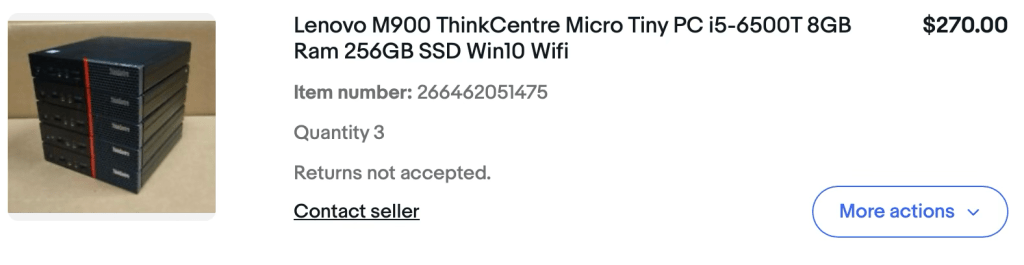
The first iteration with this hardware is not what it is now. I experimented with various operating systems and cluster architectures before landing on what I have now. It actually became a running joke between my roommate and I that I may not ever stick with on an architecture long enough for either of us to make any use of it. It took me seven months to get there.
I have used it to teach myself how single sign-on works and how to properly deal with networked storage shares. Now, I am teaching myself how to best configure my cluster in Proxmox to take advantage of its high availability features. I have learned about BIOS modding, intermediate networking, and how infuriating DNS can be.
Maybe this will put me on the path to becoming a professional system administrator. Maybe it will forever remain a hobby by night while I write code or analyze passenger habits by day. Either way, I’m excited to see where it takes me.
 Noah S. Roberts